With iOS 26, iPhone will learn to ask you to clean the camera lens

Apple has introduced a feature in the iOS 26 beta that will detect when a camera lens is dirty. When activated, the phone analyses the camera image and determines when the lens is dirty. If the photo becomes blurry or darkened, the system displays an unobtrusive notification with a hint: "Wipe the rear camera."
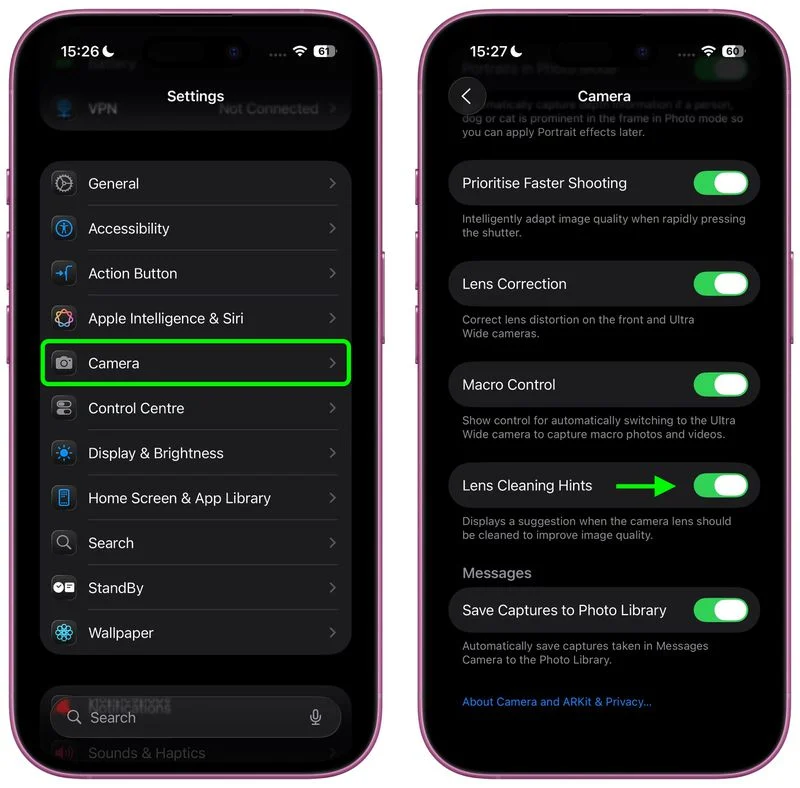
Here's how to turn on the camera wipe prompt. Illustration: macrumors.com
How to enable (if you have iOS 26 beta 6):
- Open Settings
- Go to the Camera settings item
- Switch on the Lens Cleaning Hints toggle
Once activated, the presence of frames or streaks will be automatically analysed when you use the camera.
This feature is useful when it is difficult to assess the quality of the image on your smartphone screen, for example, in bright sunlight or with a backlight in your eyes. Similar features are already available on Android devices, but this is a debut for iPhone. Along with the updated camera interface and focus mode, Apple continues to improve the camera interface.
Source: www.macrumors.com


