Valve has updated the performance monitor: Steam now shows which frames are generated by DLSS or FSR

Valve has updated the built-in performance monitor in Steam, and now it doesn't just display the number of frames per second, but reveals how many of them were actually rendered by your graphics card, and how many were generated using technologies like NVIDIA's DLSS or AMD's FSR. This update is a game changer for anyone who is concerned about performance and image quality - especially in the era of frame generation, when FPS numbers can be deceiving.
Here's What We Know
Steam users now have access to a new graphics overlay that shows both total FPS and a breakdown of real and generated frames. Thanks to this, you can finally understand how much your system is "pulling" the game, not just drawing pretty numbers. Valve has also added visualisations of CPU, graphics card and RAM utilisation, as well as minimum, maximum and average FPS values. All this works in real time and is available right during the game without the need to use third-party tools like MSI Afterburner or RivaTuner.

Updated performance monitor. Illustration: Steam
Frame generation support became especially interesting. With the advent of technologies that artificially "insert" frames between real ones, the picture does become smoother - but that doesn't mean the game runs faster. Until now, most players have only seen the final FPS figure, without knowing how many of those frames were drawn "for real". Steam's new monitor eliminates this confusion.
It's important to note that visually there may be no difference, but the response (input lag) when using the generated frames may be different. So for cybersports or fast response in shooters, it's best to understand exactly what you're looking at. Steam now gives you that ability by showing you the truth about every frame on the screen.
The innovation is already available in the latest version of Steam (Client Beta) and is activated manually through the interface settings. Valve plans to continue to develop this tool, making it more powerful, but at the same time as easy to use as possible - so that both the enthusiast and the beginner.
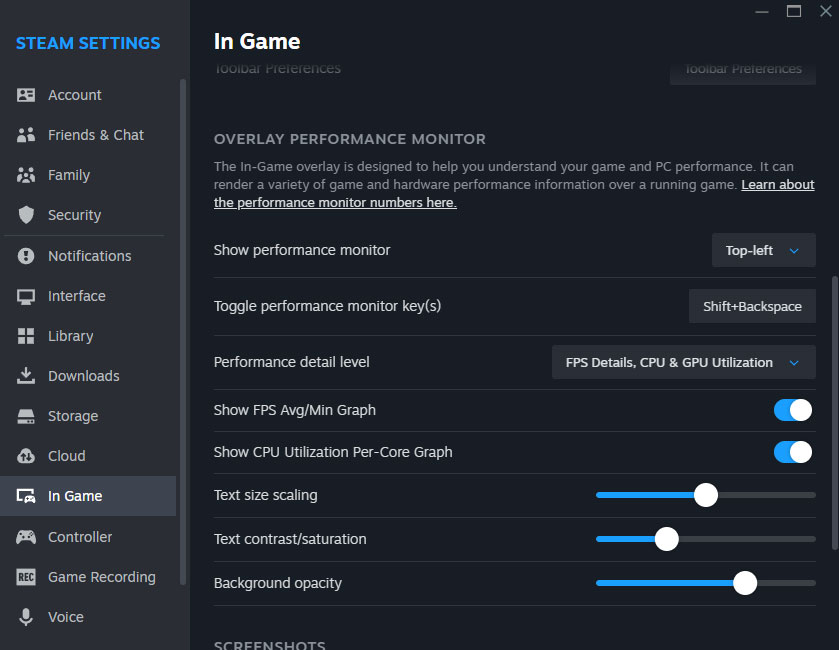
Performance Monitor interface settings. Illustration: Steam
Source: Steam


